

Export base
MySQL data
You can export your database (dump the database) to your computer, via PhpMyAdmin. Refer to the instructions below.
Export base MySQL data
To log into PhpMyAdmin you need to use
User data from the database - data you entered when creating the database.
You can export your database (make a database dump) to your computer, via PhpMyAdmin. According to the instructions below.
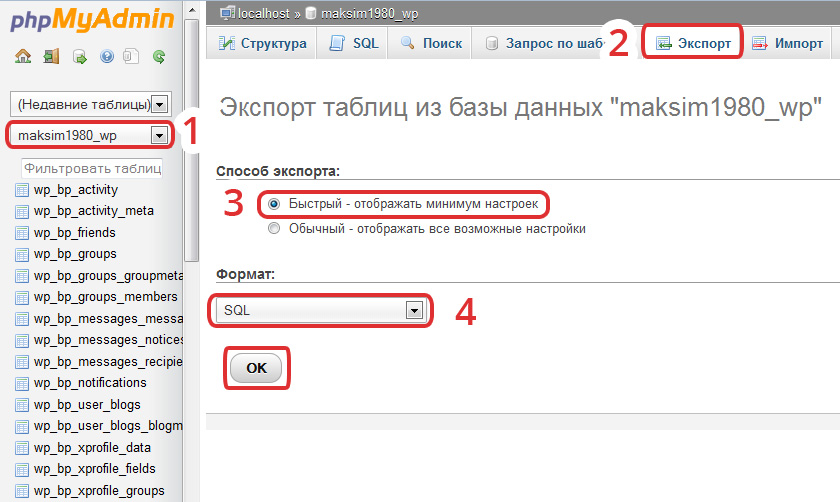
1. Select base (left-hand side of drop-down list).
2. Select Export tab.
3. Select "Export Method" (normally Quick).
4. Select "Format" (Normally SQL). Press the "OK" button.
5. The system will prompt you to download the file - click "OK" to save the dump database to your computer.
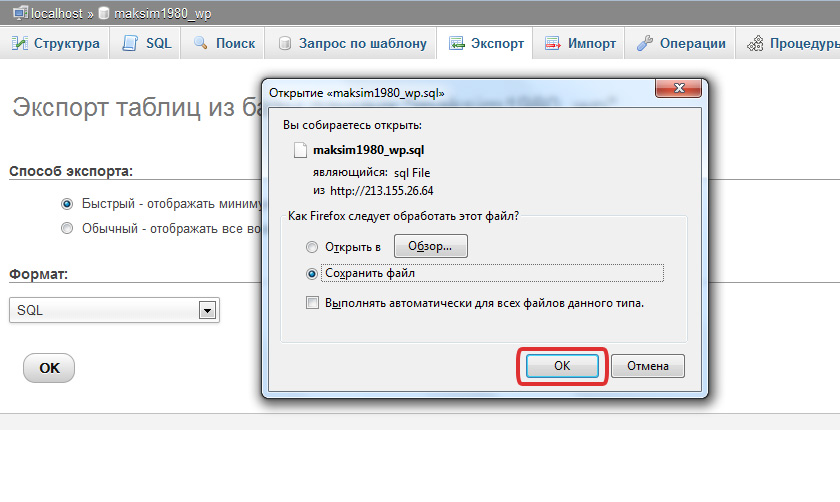
Export successful completed
Save the SQL dump file to your computer.

Hosting for 1 USD per month!
Get fast hosting with high-quality support. Use our bonuses, like free domain, free SSL, and others.
- We guarantee fast hosting!
- High-quality service and low prices!
- Round-the-clock access to the site for 99.9%
After login, additional order management options will appear.
Not registered?
New account registration
0 + customers have chosen Hostia.Net